Ocropus vs Tesseract: Which OCR Engine Fits Your Architecture?
Optical character recognition has become a core capability in document automation, data extraction, and AI pipelines. Many developers still turn to two well-established open-source engines: Ocropus (OCRopus) and Tesseract. Each engine approaches segmentation, recognition, and training in a different way. To choose the right one, you need to align their strengths with the architecture you plan to build.
This article breaks down how both engines work, the computational considerations of each, and where they fit inside modern pipelines.
Understanding the Core Difference
Tesseract is a mature, highly optimized all-in-one OCR engine. It handles layout analysis, segmentation, and text recognition inside a single flow. Its default mode processes complete images and produces text with minimal configuration.
Ocropus is more modular. It splits document segmentation, line detection, and text recognition into separate stages. It gives you the ability to shape your own pipeline, plug in custom models, and tune the system to the documents you handle.
Both are open source and widely adopted, but their internal designs push them toward different architectural use cases.
High-Level Architecture Comparison
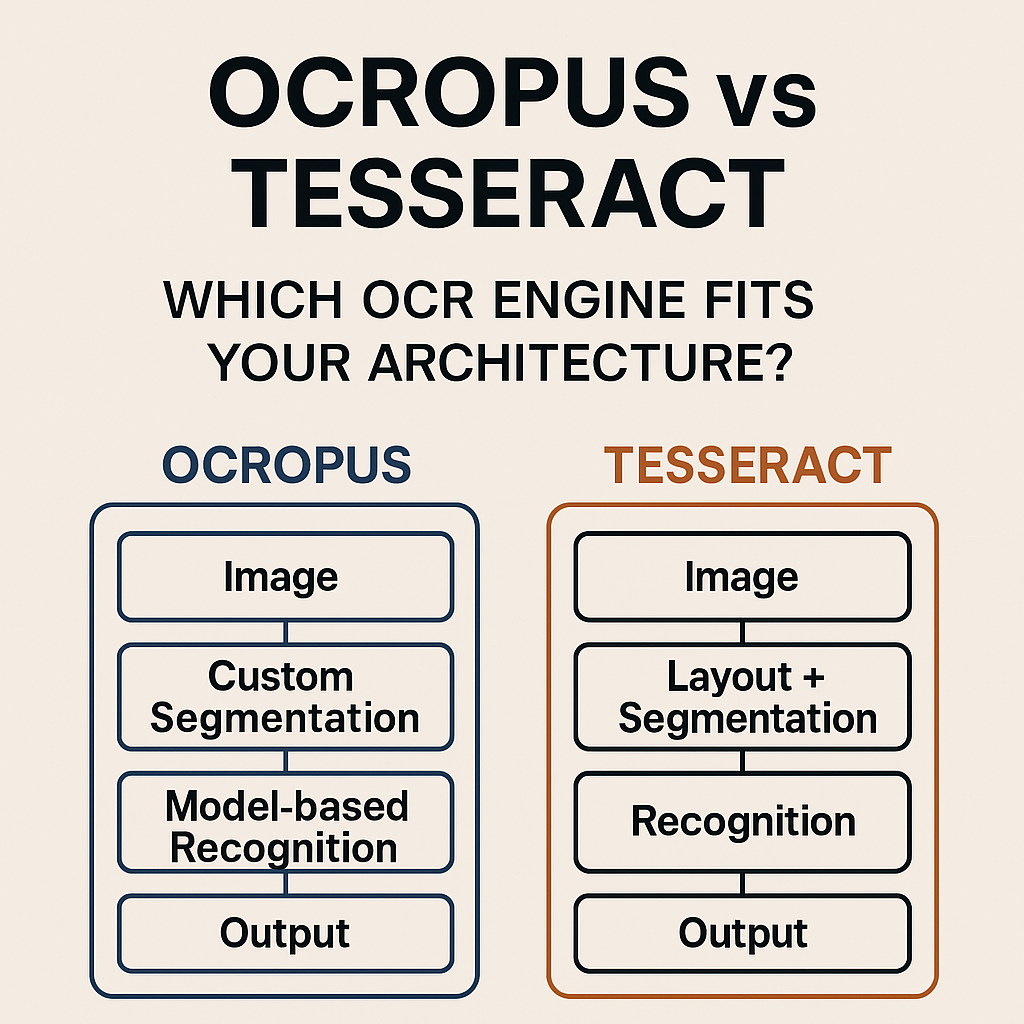
           OCR Architecture Overview
 -------------------------------------------------
 |                     Image                     |
 -------------------------------------------------
                |                     |
        Tesseract Flow        Ocropus Modular Flow
                |                     |
       Layout + Segmentation   Custom Segmentation
                |                     |
           Recognition        Model-based Recognition
                |                     |
              Output              Output
Tesseract hides its internal stages. Ocropus exposes them.
Tesseract: Strengths and Architectural Fit
Tesseract started as a research project at HP and was later adopted and improved by Google. Its current deep learning based LSTM model is stable, well-tested, and supports a wide range of languages.
Where it excels
Fast deployment
Tesseract requires little configuration. It is ideal when you want OCR without building a custom pipeline.
Broad language support
The project includes many pre-trained languages and works well across multilingual documents.
Good performance on clean scans
Printed text and simple layouts often achieve high accuracy without additional tuning.
Lightweight architecture
It works efficiently on CPU, making it suitable for serverless or container-based scaling.
Where it struggles
Complex layout handling
Tables, forms, and irregular layouts can reduce accuracy. Its layout analysis is not easy to replace.
Limited segmentation control
Developers who need full control over segmentation may find Tesseract restrictive.
Custom training difficulty
Training models is possible but requires more steps and a deeper understanding of its training data format.
Best architectural fit
Tesseract is ideal for:
• API-driven OCR microservices
• Serverless document processing
• Systems with predictable document formats
• Applications requiring multilingual support
When simplicity is the priority, Tesseract fits naturally.
Ocropus: Strengths and Architectural Fit
Ocropus is built for modularity. It encourages you to assemble your own OCR pipeline using its tools for binarization, segmentation, and recognition. This gives engineering teams more control but also requires more design work.
Where it excels
Full segmentation control
You can replace every stage, from image binarization to line extraction and recognition.
Strong line-based models
Ocropus uses line-oriented recognition that often performs well on noisy or historical documents.
Straightforward custom training
It is easier to build your own models, making it strong for domain-specific OCR.
Transparent architecture
The pipeline is easy to inspect, modify, and integrate with deep learning tools.
Where it struggles
More setup work
Out of the box, Ocropus is not as plug-and-play as Tesseract.
Limited pre-trained language support
You often need to train your own models.
More pipeline orchestration
Your system must coordinate each stage manually: segmentation, cropping, recognition, and text assembly.
Best architectural fit
Ocropus is ideal for:
• Research projects
• Historical documents, manuscripts, or handwriting
• AI-driven workflows that combine custom image models and specialized recognition
• Python-based ML stacks
• Scenarios where accuracy improves with tailored training
If you want control and flexibility, Ocropus aligns with that goal.
Architecture Breakdown
Tesseract flow
 ---------------------------
 |   Input Image (page)    |
 ---------------------------
             |
     Preprocessing
             |
     Layout Analysis
             |
    Character Segmentation
             |
     LSTM Recognition Model
             |
        Text Output
Ocropus flow
 -----------------------------
 |    Input Image (page)     |
 -----------------------------
             |
        Binarization
             |
       Page Segmentation
             |
     Line Detection & Cropping
             |
     OCR Model per Line (LSTM)
             |
        Aggregation
             |
            Text
Tesseract integrates everything. Ocropus exposes each step.
Performance Considerations
Tesseract
Speed
Fast on CPU and suitable for high-volume workloads.
Memory
Low and predictable.
GPU support
Not available.
Scaling
Easy to scale horizontally by running multiple instances.
Ocropus
Speed
Slower without optimization. Segmentation can become a bottleneck.
Memory
Heavier due to multiple model stages.
GPU
Some adapted versions support GPU acceleration during recognition.
Scaling
More flexible but requires pipeline management.
Accuracy Differences
Accuracy depends on the structure and quality of your documents.
Clean printed pages
Tesseract often wins due to optimized page-level recognition.
Historical or noisy documents
Ocropus usually performs better because you can fine-tune segmentation and train custom models.
Multi-column layouts
Both engines struggle, but Ocropus allows you to integrate custom layout detection.
Handwriting
Neither engine is perfect. Ocropus is more adaptable for handwriting research.
Architecture Fit Scenarios
Predictable documents at scale
Resumes, invoices, receipts.
Best fit: Tesseract
Research on manuscripts
Historical archives or library digitization projects.
Best fit: Ocropus
Custom ML preprocessing
You integrate your own segmentation or denoising models.
Best fit: Ocropus
Serverless OCR
Triggered by storage events in a lightweight environment.
Best fit: Tesseract
Pipeline Decision Diagram
Pipeline Decision Guide
----------------------------------------------
Are your documents predictable?      Yes → Tesseract
                                       No
Do you need custom segmentation?     Yes → Ocropus
                                       No
Do you want minimal setup?           Yes → Tesseract
                                       No
Do you plan to train your own model? Yes → Ocropus
                                       No → Tesseract
References
The following are primary project resources with direct links. They contain documentation, tools, and implementation details relevant for further architectural planning.
Ocropus links
https://github.com/tmbdev/ocropy
https://github.com/ocropus/ocropy
https://ocropus.github.io
Tesseract links
https://github.com/tesseract-ocr/tesseract
https://tesseract-ocr.github.io/tessdoc
https://tesseract-ocr.github.io
Final Recommendation
If your architecture values simplicity, predictable performance, and broad language coverage, Tesseract is the natural choice. It handles common OCR tasks with minimal work and scales well in distributed environments.
If your architecture depends on customization, experimentation, or training domain-specific models, Ocropus gives you the control you need. Its modular structure makes it more adaptable to irregular documents, historical texts, or AI-enhanced preprocessing steps.
The best engine is the one that aligns most closely with the structure of your documents and the engineering approach of your system. Both tools remain powerful, but they shine in very different conditions.